
Typing the same phrases repeatedly, without thinking about it, gradually makes you work more slowly. This is particularly true in jobs with lots of emails, reports, or answering customers. Surprisingly, even a little bit of retyping something you say frequently really reduces your overall productivity.
SmartPanels is a really supportive tool to automate this kind of work. Instead of all that repetitive typing, it allows you to use and reuse short chunks of text, so you type faster and are less likely to make errors.
So, if you are looking for the best text-expanding programs or simply want to automate typing on Windows, SmartText is a simple and effective solution. This blog will cover what it does, the benefits of using it, what it’s for, and how it helps when you’re actually using it.
What is SmartText?
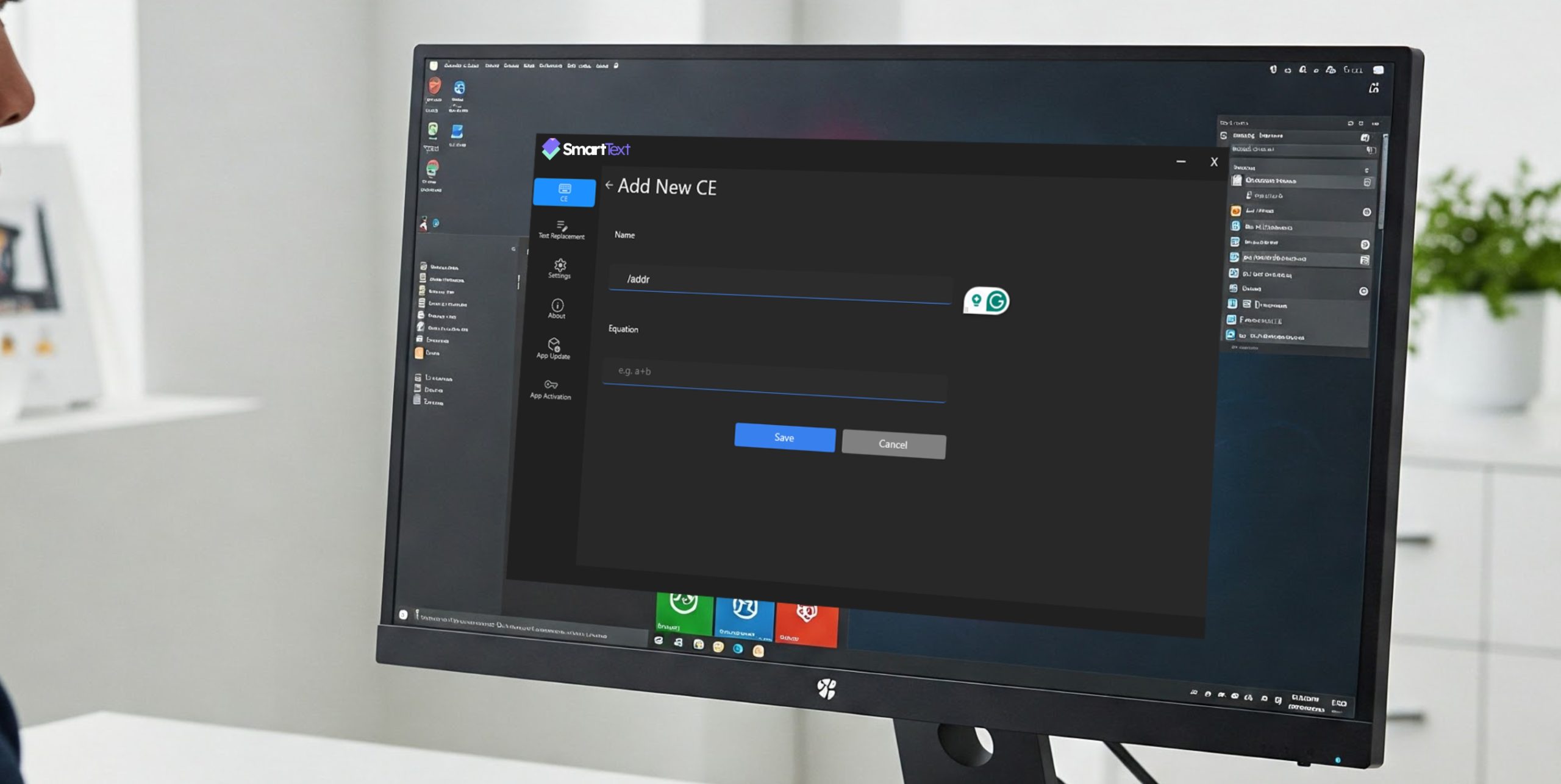
SmartText is a powerful tool that automates your text, allowing you to create blocks of text that you frequently use and quickly access them while writing. You don’t have to keep typing out the same things over and over, because SmartText will do it for you with a short shortcut or a chosen ‘trigger.’
It’s a lot like a very clever auto-complete for text; when you type a brief word or phrase, SmartText will turn it into a whole sentence, a paragraph, or even a properly formatted document. For instance, if you typed “/intro”, a full email opening could appear right away.
This tool is useful in all sorts of situations: for emails to customers, for notes and documents you use at work, and for many other applications across lots of different kinds of businesses. It’s a typing shortcut you can depend on.
Why SmartText Matters for Productivity
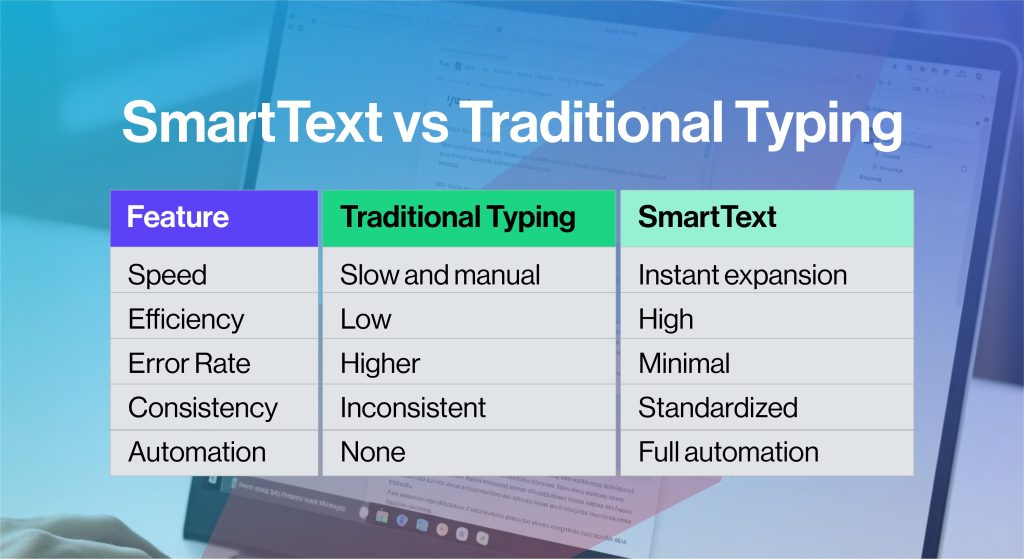
We so often forget how much time we lose just by doing the same typing repeatedly and it’s a serious hit to how much we get done. Studies show people in office jobs spend almost a fifth to nearly a third of their workday on boringly similar things on the computer, like typing out the same answers, or making things look nice.
SmartText does a lot of the typing for you, almost as if by magic. It’s important for these reasons:
- You can save a lot of time, as much as half, on things you type over and over.
- People who use automated tools get things done 30 to 40% more quickly. Because you aren’t repeating yourself as much, you can concentrate on the work that really needs your brainpower.
- And finally, keeping to standard replies makes your messages easier to understand and makes you look more polished and professional.
Key Features of SmartPanels SmartText
SmartText is cleverly designed to be both straightforward and do a lot. Here are the things that will really make a difference for you:
1. Smart Text Snippets and Templates
You can make content to use repeatedly for emails, reports, responding to customers, and all sorts of things. It’s a place to keep anything from quick bits of wording to a longer explanation, so it’s a cinch to utilize organized details.
2. Instant Auto Text Expansion
SmartText is a robust automatic text expander, changing quick little abbreviations into full paragraphs of text right away. This means far less typing, and things get done at a seriously quicker pace.
3. Dynamic Placeholders
Instead of just sounding like a robot, SmartText lets you insert things like people’s names, the current date, or whatever specific information you want into your automatic replies. It’s what makes them feel like they’re coming from a real person, not just a standard form.
4. Cross-Workflow Integration
This isn’t limited to one program. You can use it to speedily type out things in email, your web browser, Word documents, or tons of other applications.
5. Centralized Content Management
You get to keep all those little chunks of text you use all the time in a single spot, neatly arranged. So, finding what you need and keeping things under control is much easier.
6. Windows Optimization
As a text expander for Windows, SmartText is optimized for performance and compatibility, making it a seamless addition to your workflow.
How SmartText Works
SmartText is a program that’s not hard to learn to use, even if you don’t know a lot about computers. It operates in a very straightforward way, with these steps:
- First, you make a snippet; that means you write out a piece of text you use again, perhaps a reply to an email, a standard greeting, or a document template.
- Next, you give this snippet a quick “shortcut,” something like “/thanks” or “/followup.”
- Then, when you are in any program, simply type your shortcut. And almost immediately, the entire piece of text will show up, totally taking the place of the shortcut you typed.
For example;
If you write or support, you’ll receive an immediate response:
“Thank you for reaching out. We’ve received your request and will respond shortly.” You will not need to retype the entire content, and importantly, you will reproduce it consistently in the same manner each time.
SmartText transforms typing from a manual process into an automated system, making it far more efficient.
Common Use Cases of SmartText
SmartText works in lots of different jobs and types of businesses. For example:
1. Customer Support Teams
Customer support people frequently get asked the same things again. SmartText lets them give a quick answer with responses they’ve already written, and this can get the answer to the customer up to 40% faster.
2. Sales Professionals
Salespeople can use SmartText to automatically send out initial emails, later follow-ups, and proposals, meaning everyone hears the same message and the sales team can contact more people.
3. Marketing Teams
Marketing teams can use previous campaign designs, wording for ads, and ways of expressing things to work quicker and be more consistent.
4. Content Writers and Bloggers
When it comes to writing articles and blog posts, writers can keep collections of plans, how to lay things out, and phrases they use often, which greatly decreases how long it takes to write.
5. Administrative Professionals
Administrative assistants can automate typical tasks such as meeting minutes, reports, and updates, freeing up many hours each week.
How SmartText Helps You Automate Repetitive Tasks
Doing the same typing repeatedly isn’t just a waste of time; it really doesn’t have to be done that way. SmartText does the repetitive work for you with automatic processes.
You simply create something once, use it immediately, and then let it work on its own, instead of typing the same email repeatedly, copying and pasting replies, or endlessly reworking standard messages.
For professionals who deal with lots of messages, this change could get you 5 to 10 hours back in your week.
And if you’re asking yourself how to ditch all that repetitive typing?
SmartText is one of the easiest, best ways to get it stopped.
SmartText vs Other Text Expander Tools
Lots of programs will let you quickly type out phrases from short abbreviations, but SmartText is really all about being simple to work with and fast. What’s great about it?
Key advantages:
- Easy to set up and use
- Designed specifically for Windows users
- Clean and intuitive interface
- Suitable for individuals and teams
Tips for Getting Started with SmartText
To fully utilize SmartText, follow these steps:
- Begin by creating shortcuts for things you type all the time. Make those shortcuts easy to remember and straightforward.
- Next, please organize your saved snippets into groups to easily locate them when needed.
- Don’t just set it and forget it; keep going back to your templates to improve them.
And it’s a good idea to see how much time SmartText is saving you to prove to yourself how worthwhile it is. You’ll be much faster and get a lot more done in just a few days, you’ll find.
Conclusion
SmartText isn’t simply about typing things quicker; it’s a whole way to get a lot more done and with much less hassle. It does all your text work, saving you time, reducing errors, and ensuring consistency. And those little time-savers really add up to a much smoother and more productive way of working.
For Windows users, SmartText is a reliable text automation tool that is both easy to use and surprisingly capable. It’s a text expander for Windows, an auto-text expander, and a typing automation tool that can grow with your needs, all delivering improvements you can actually see and without being overly complicated.
In simple terms, SmartText is a straightforward and powerful solution if repetitive typing slows you down. It’ll quickly become a vital part of how you do things, helping you to work with more intelligence, at a quicker pace, and with a lot more efficiency, day in and day out.
Want to save your time?
[Switch to SmartText]