
On the surface, a second screen is an easy enough upgrade. Make the connection, put your desktop in extended mode and you are looking at email, a browser and your principal work app all at once. Yet one can’t help but have a nagging doubt about it. Does a second monitor affect performance, or is that just an old myth passed around forums?
That is a fair concern given how much our remote work, gaming and streaming rigs are built around having more than one display. The truth of the matter is not so clear cut; it is hard to say with any certainty without considering your CPU and GPU, the refresh rates and the demands of your workload.
To put an end to the guesswork, this guide will walk you through what really happens when you put in another monitor. We have the benchmarks and the technical explanation to back it up, allowing for a workspace that is set up with some assurance.
Does a Second Monitor Affect Performance? The Short Answer
Over an ordinary day, the answer is no. A contemporary graphics card will put out two displays with no trouble at all. But you see a different picture when it comes to video editing or gaming, or if one is running at high refresh rates. Does a second monitor affect performance in those cases? Slightly, yes.
But the drop is usually small enough that you would not notice it without a benchmarking tool running in the background.
Consider it akin to an extra passenger in the car; the engine is fine; it is only shouldering more load. What matters in the end are four factors: the hardware and resolution you have, the refresh rate, and what is being put on that second screen.
An idle desktop is negligible in terms of cost, whereas a 4K video in the background is another matter entirely. To understand the technical side of things, we should start with the GPU, which is where the confusion tends to lie.
How a Second Monitor Actually Works with Your GPU
A display engine is found in every graphics card, distinct from the rendering cores. Its job is to take care of output timing, color correction and scaling for whatever screens are attached.
While it operates on its own from the side of the GPU that is doing the work of rendering an application or game, the engine is not without cost; it will consume power and at times leave the memory clock running high.
Does Dual Monitor Use More GPU?
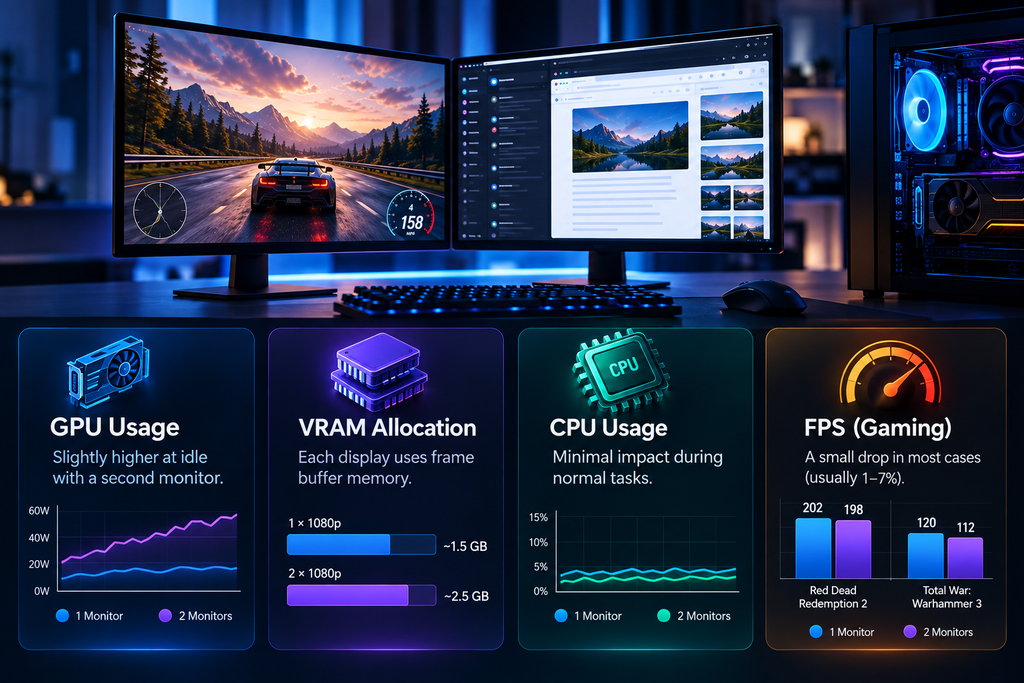
Yes, technically, though mostly at idle. Does dual monitor use more GPU capacity than a single-screen setup? There is a good reason for it. The GPU will run up the clock on a slice of its VRAM so as to handle two separate refresh rates at once, which in turn puts a bit more strain on power and can raise the temperature even if neither display is being put to any hard work.
We have seen this well documented of late with reports from users of certain AMD and NVIDIA hardware. Put a 144Hz screen next to a 60Hz one and you will find the idle power can go from about 10 watts to 40 or better. It is all in the name of keeping the memory timings in sync between the two.
One way to do away with that surplus draw is to make sure the refresh rates are the same; alternatively, running the second monitor off the integrated GPU on the motherboard is an effective solution.
VRAM Allocation Across Two Screens
The GPU will set aside VRAM for the frame buffer of every display, that being the portion of memory where the next image to be rendered is held.
One 1080p screen could take up in the region of 1.5GB. Put in a second 1080p and the total comes to some 2.5GB or so, which is a function of your color depth and driver configuration. In and of itself it is not much compared with the 8 to 16GB on a typical modern card, and as such one would not expect it to become a bottleneck unless working with an older, more limited GPU.
Does Dual Monitor Affect FPS?
Gamers ask this question the most, and for good reason. Frame rate is the clearest, most measurable sign of performance. So, does dual monitor affect FPS while playing?
Real-World Benchmark Results
There is a measurable, if unremarkable, drop in performance according to independent tests. One of the more notable examples comes from a Linus Tech Tips comparison: on a taxing game like Red Dead Redemption 2, frame rates fell from some 202 FPS on a single monitor to around 198 with four in use, a difference of just under 2 percent.
The gap is more pronounced with something like Total War: Warhammer 3, approaching 7% when four displays are active as opposed to one. Yet even that is not as much of an issue with two-monitor configurations, where the hit to FPS is less.
Why the Drop Happens at the Driver Level
You can put the dip down to the way your GPU driver is handling its rendering schedule. For every display that is hooked up, idle or not, the driver must put in the work of allocating a scan-out buffer and running compositing instructions from the Windows DWM. Inevitably some of that scheduling overhead will vie for resources with what is going to your game.
A high-end GPU will make short work of it, but if the card is already pushed to the limit, you may see a few frames get left on the table.
When FPS Drops Become Noticeable
Context matters here. On a high-end GPU pushing 200+ FPS, losing a handful of frames is invisible. On older hardware struggling to hold 30 FPS, that same percentage drop can cause visible stutter. So, the honest answer to does dual monitor affect FPS is: barely, unless your hardware is already stretched thin.
Then there is the matter of what is being displayed on the second screen, which can upend the equation. If it is an idle desktop, the cost is negligible. But put a 4K video stream on it and the GPU’s decoder has to be in constant use; you will see that take its toll on the frame rate of your game, with a loss of 5 FPS or more in some cases, contingent on the codec.
Does Dual Monitor Use More CPU?
GPU load gets most of the attention, but your processor plays a role too. Does dual monitor use more CPU capacity compared to a single display? To an extent, but it is a different matter altogether from what the GPU does, and the effect is not as pronounced.
The CPU is responsible for all the window management and compositing directives, as well as the logic of any background applications in every open window, no matter where on the monitor array they are shown. In practice one tends to have more windows open with two screens, and the OS compositor will levy a small, continuous cost on the CPU for each one. A second monitor left blank is hardly a factor in terms of load, given there is nothing to manage.
For the most part you will not see any strain on a modern processor, even a mid-range six-core, while doing your usual spreadsheet or writing work with multiple displays. It is only when the dual setup is put to use with something that is hard on the CPU – think video encoding, virtual machines, or a half dozen browser tabs running scripts and animations simultaneously – that the processor starts to show its limits.
Does Using 2 Monitors Decrease Performance for Everyday Tasks?
For office work, browsing, coding, or writing, does using 2 monitors decrease performance in any meaningful way? You will not see it in practice. The sort of work being done does not tend to put much strain on the CPU or GPU anyway, so any minor overhead from an extra display is readily absorbed.
Dual monitors are a boon for efficiency in the eyes of many a professional, even though they do call on a small measure of processor and graphics power. The additional screen real estate means less time is wasted alt-tabbing or having to resize and shuffle windows about. In the end, the productivity you get out of that is well worth the negligible hit to performance.
Does Multiple Monitors Slow Down a Computer? Common Causes
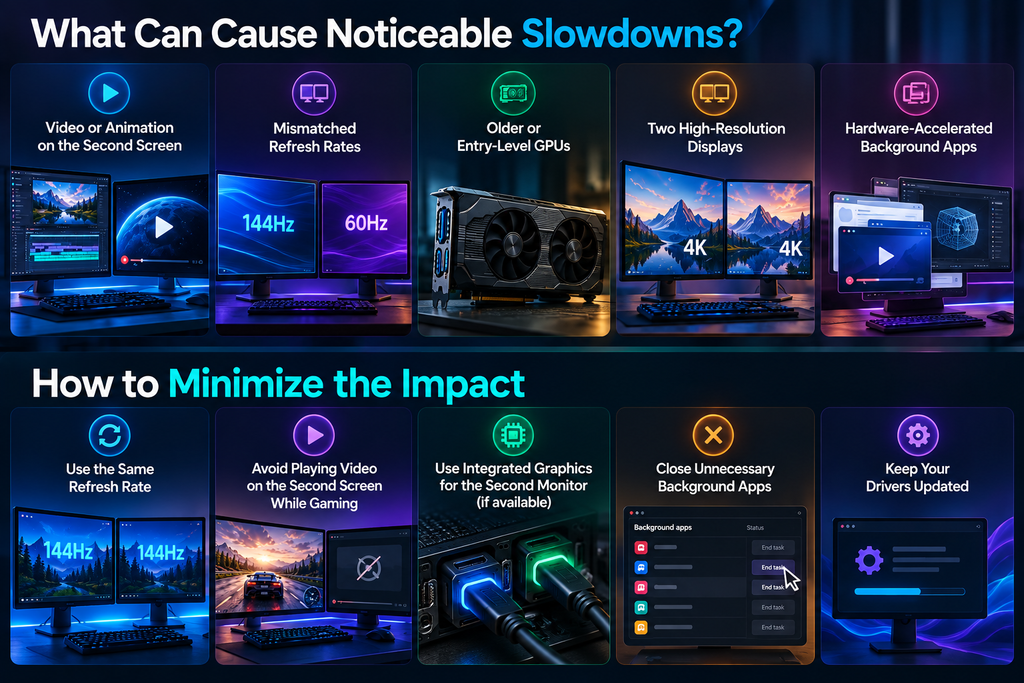
So, when does a slowdown happen? Does multiple monitors slow down a computer noticeably, and if so, why? A few specific scenarios cause real, measurable drops:
- Running video or animation on the second screen: Decoding video pulls GPU resources away from your primary task, and this is the single biggest cause of noticeable slowdown.
- Mismatched refresh rates: This can force your GPU’s memory controller into a higher power state around the clock, raising temperatures and, occasionally, causing stutter.
- Older or entry-level graphics cards: Budget GPUs have less headroom, so display overhead shows up sooner than on a high-end card.
- High resolutions on both screens: Two 4K monitors demand far more from your GPU’s memory bandwidth and rendering pipeline than two 1080p screens.
- Background software using hardware acceleration: Certain browsers, chat apps, and overlays lean on GPU acceleration, and this adds up across multiple open windows.
Outside of these specific triggers, a healthy modern system handles two monitors comfortably, without any real slowdown during normal use.
Does Duplicating Displays Affect Performance?
Extending your desktop across two monitors differs technically from duplicating, or mirroring, the same image on both. So, does duplicating displays affect performance differently than extending them?
For the most part, duplicating is less of a strain on GPU resources than an extended configuration. The system must render just a single image and then put it out to both displays. That said, should the monitors have different native resolutions, the GPU will be forced to scale the image for each one independently, which is some additional work. But in practice it is a negligible expense compared with what you would see from gaming or video decoding on an extended setup.
How to Minimize Any Performance Impact from a Second Monitor
There are several simple adjustments to be made for those looking to wring out the last bit of performance.
- Where you can, set the refresh rates on both monitors to the same figure; it is better not to put the GPU in a higher power state than necessary.
- Put an end to any background applications that are not in use, particularly hardware-accelerated ones such as chat or browser clients.
- And when gaming or with other software that is hard on the system, do not have video playing on the second screen.
- If the motherboard has integrated graphics, make use of them for the secondary display and let your dedicated GPU get on with its work.
- On top of that, keep the graphics drivers current, as manufacturers are often putting out patches for multi-monitor issues of one sort or another. It is the kind of thing that makes a difference over time, especially for a gamer or creator with resource-heavy programs running on an extra display.
Final Thoughts on Whether a Second Monitor Affects Performance
Will adding a second monitor have an impact on performance? During normal computing, you are not going to notice any difference. The GPU will put in a little extra work with its display engine and VRAM, the CPU has to manage a few more windows via the compositor, but the system keeps right along without issue.
Those who game or use heavy creative tools might register a fractional drop-in frame rate, perhaps a point or two in the low single digits, though it seldom gets in the way of things. Often, what is being displayed on the additional screen is of greater consequence than the hardware itself. A word to the wise: keep your drivers current and don’t let too many background tasks run wild and make sure the refresh rates are in sync. Then you can have the added convenience and workspace of a dual setup with no performance penalty to speak of.
FAQs
Does adding a second monitor reduce your gaming FPS permanently?
The answer is no. You will see a drop in performance only when both screens are put to work and rendering content at the same time. Put the second monitor aside and you can have your original frame rate back in an instant.
Do I need a more powerful GPU just to run two monitors?
Then again, it is not something for daily use. These days any GPU from the past few years is more than up to the task of running two displays for your office work, writing or general browsing. One would need a more powerful card to game or do video editing on both at once.
Does a second monitor increase my electricity bill?
There is a marginal impact in that it will put your GPU in a higher idle power state by drawing on its own supply. But for the average household this is hardly a material expense, amounting to perhaps a few dollars over the course of a year.
Can I fix high idle GPU power with dual monitors without buying anything?
As for the rest, the answer is usually yes. A good number of users find they can put an end to the problem without spending anything more by simply bringing the refresh rates of the two monitors in line or with a graphics driver update.
Is it better to use one large monitor instead of two smaller ones for performance?
Performance-wise, they are nearly identical at matching total resolution. The choice mostly comes down to personal workflow preference, not speed.