

When you type the same things over and over, your work gets done much more slowly, and this phenomenon is particularly true if your job is full of emails, reports, computer code, or filling in data. Repetitive writing, like ending messages with the same phrases, is boring and error-prone. With more to do and people expecting things to be done quickly, even little things that slow you down build up and make a real difference in how much time you lose.
Because of this, lots of people are changing to better ways of working to do less work by hand. A dependable text automation tool can completely change how you finish tasks by reducing the need to repeat yourself and ensuring your communications are consistent.
SmartPanels developed SmartText to easily automate typing on Windows. It uses shortcodes, instantly turns those into longer text, and allows process automation to give you back valuable time to concentrate on work that truly matters and makes a difference instead of endlessly typing.
What Is a Text Automation Tool?
A text automation tool lets you stop doing the monotonous work by using smart shortcuts to create longer text for you. Rather than typing out phrases you use frequently, you make little “commands,” and the program will turn them into much bigger chunks of text. It happens immediately as you type, with the program noticing what you’re writing and swapping it for text you’ve already set up.
How Text Expansion Works
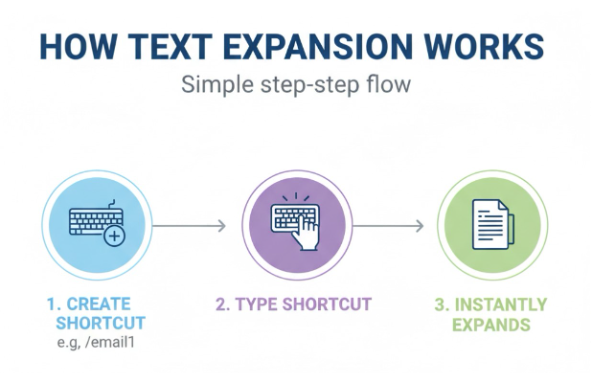
Text expanders, simply put, let you create shortcuts for your most frequently typed phrases. For example, instead of having to write or copy and paste a whole email, you could type something quick like “/email1” and it will turn into your complete, professionally written email.
This means you don’t have to keep repeating yourself with the same words. It happens immediately, improving how quickly you work and not breaking your train of thought.
Why It Matters in Daily Work
Most jobs that involve computers require a lot of typing. In fact, research shows people at work spend over two hours every day on emails and messages. If you’re typing the same things over and over, it makes you do more work than you should. Even a small amount of automation can save people several hours each week and enhance their work efficiency.
From Basic Tools to Smart Automation
In the past, text automation applications would only change one bit of text for another. Now, tools like SmartText offer complete automation; they give you content that changes as you use it and quick ways to make things happen with ‘hotkeys.’
Because of this feature, these tools are now really important for anyone who wants to work more efficiently.
Why Repetitive Typing Is a Problem
Repetitive typing may feel like a normal part of work, but it introduces inefficiencies that can impact both productivity and mental focus over time.
Time Loss Adds Up Quickly
While it may seem insignificant to repeatedly type the same things, it accumulates significantly. If you spend a mere twenty minutes each day retyping, you’ll lose more than six hours a month. And when you look at a whole year, that’s a surprisingly large amount of time you could have used for other, more useful work.
Mental Fatigue and Reduced Focus
Doing the same thing repeatedly makes you bored and your work feel tedious. This eventually makes you mentally exhausted, and that makes it harder to focus or come up with new ideas. You end up using your energy for just typing things in, rather than the important parts of your job.
Workflow Disruptions
And the routine of going from typing to copying to fixing things breaks up what you’re doing. In fact, studies have shown that jumping between tasks like these can lower how much you get done by as much as 40%. A lot of this is down to all that repetitive typing, and it’s this that really interrupts your flow and makes things take longer.
SmartText: The Best Text Expander Tool for Windows
SmartText is a program for Windows that’s designed to make typing things automatically really easy and straightforward. It has some powerful options, so it works well for both new and experienced users.
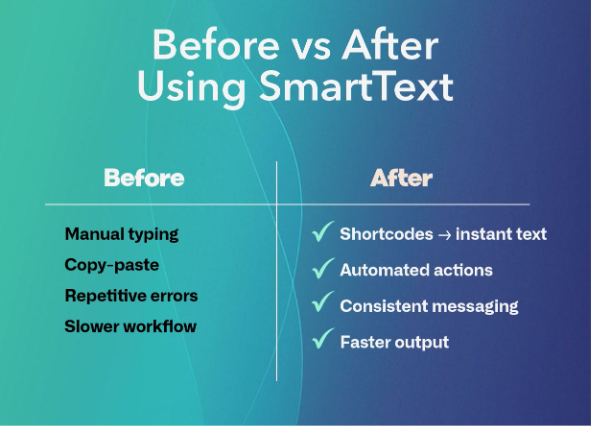
- Custom Text Expansion for Everyday Tasks
With SmartText, you can make little blocks of text to use repeatedly for things like emails, reports, or anything else you type a lot. That way you aren’t doing the same typing again and instead have a fast, uniform way to get it done. Many people find they get 20 to 30% more done when they start using tools like this.
- Hotkey Automation for Faster Execution
You can do things much faster with hotkeys, because they let you make something happen immediately. They are especially handy when you need to be efficient and things are moving quickly. Just press one set of keys at once instead of clicking through menus or writing instructions.
- Built-In Computational Commands
SmartText is not just a simple way to write things out longer; it also has commands that perform actions. You can quickly do math right as you’re working, meaning you don’t have to go to a calculator or another program. This is a huge help if your job involves typing in numbers all the time.
- Seamless Cross-Application Compatibility
Something SmartText does very well is to work in lots of different programs. It fits easily into what you’re doing in your internet browser, Microsoft Word, or a program for computer code, really in anything.
- Lightweight and Efficient Performance
SmartText works quietly in the background and doesn’t hog your computer’s speed or memory. Because of this, automating things with it won’t slow you down, so it’s something you can easily use all the time.
SmartText vs Other Text Expander Tools
While many text expander tools for Windows exist, SmartText stands out due to its balance of usability and functionality.
- Simplicity Without Compromise: SmartText is both simple to get going with and operate, so anyone can use it, yet it doesn’t hold back on the more complex options for those who already know what they’re doing.
- Advanced Automation Capabilities: Where simpler programs fall short, SmartText lets you really automate things because it handles content that changes and actions you give it as instructions.
- Cross-Application Flexibility: SmartText collaborates with all your programs, providing a seamless and interconnected approach to your tasks.
Best Practices for Using a Typing Automation Tool
To get the most out of SmartText, you have to use it with a plan:
Beginning with the things you do all the time will show you how useful it is right away, and easy-to-remember quick keys (or hotkeys) will mean people will actually start using it. When you group your saved chunks of text into understandable folders, it’ll keep things quick as you use SmartText more and more.
Additionally, regularly changing and updating it ensures that it continues to align with how you perform your job as your work evolves.
Common Mistakes to Avoid
People sometimes get in the way of automation actually helping them by setting up loads of quick keys all at once or by giving those keys names that don’t make much sense.
Also, many people do not use more complicated options, such as hotkeys and commands that change depending on what they are doing, and therefore do not benefit from everything these options offer.
To steer clear of these problems and make sure automation works well for you over time, it’s best to keep things tidy and add to your automation bit by bit.
Final Thoughts
You can avoid slowdowns and reduced productivity by not repeating the same typing. With a reliable text expanding tool for Windows, you can stop having to do those boring things, make fewer mistakes, and get a lot of time back.
SmartText is a good, simple answer to your typing needs, and it’s also very powerful. You can have your own quick keys, use hotkeys (those key combinations), and set up commands that change based on what you’re doing. Because of all these features, you can make how you work a lot easier and without a lot of difficulty.
When you’re sending emails, doing computer programming, or offering customer support services, automating things lets you work at a quicker and steadier pace. Ultimately, this will lead to increased productivity and reduced mental fatigue. Getting a robust text automation tool isn’t simply about making life easier; it’s about creating a better, more efficient way of working as the digital world asks more and more of us.
Ready to automate your typing tasks?