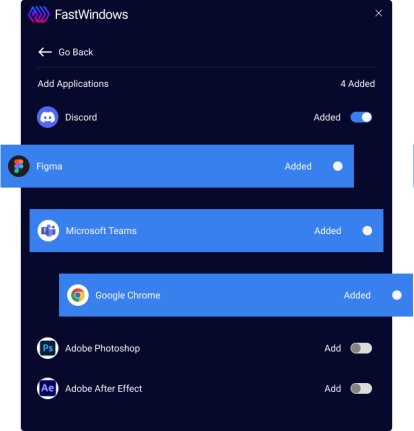
Organise your Desktop Display Efficiently
Use SmartWindows to save and restore your display settings and app positioning with a single click.
Auto arrange all your windows, whether on one screen or many with a single click!
Use SmartWindows to save and restore your display settings and app positioning with a single click.
Restore display settings on Windows 10 and ‘Snap Layouts’ on Windows 11 with SmartWindows.
Restore tabs for multiple browsers such as Google Chrome, Mozilla Firefox, and Microsoft Edge.
Automatically restore your MS Office files such as Word, Powerpoint, Excel, Project, Notepad, and Wordpad.
Improve multi-screen productivity at home and in the workplace with SmartWindows’ support of up to 6 displays.
Create unlimited profiles seamlessly to switch between work, play, and study efficiently. Restore relevant profiles and applications whenever you need.
Switch between profiles to efficiently restore each profile and relevant applications.
SmartWindows enables IT managers to create multiple displays to view and monitor electronic data operations efficiently. With the dual and multi-monitor setup, IT managers can increase overall productivity at work.
SmartWindows allows software programmers to multitask efficiently with multiple desktop apps. Open IDEs, browsers, MS Office files, and terminals on one screen or create separate profiles/displays for easy access. Save the display configurations and auto-arrange your screens on one or many screens with a single click.
SmartWindows is the best productivity app for gamers when it comes to managing gaming and work setups efficiently on a single PC. Create unlimited profiles and multiple displays for work, study, and entertainment purposes. Save and restore profiles whenever you need.
SmartWindows is one of the best teacher tech tools that allow teachers to create separate profiles for multiple classes or subjects. Teachers can create multiple work profiles to manage the files, attendance, results, and lesson plans of different classes in an organized way. SmartWindows enables teachers to arrange apps on the screen and save time by restoring them anytime with a single click.
SmartWindows allows social media managers to create multiple browser profiles, remember the display configuration, and reopen closed tabs on one or many screens automatically. SmartWindows’ apps auto-restoration feature saves time rearranging apps and reopening browser tabs.
SmartWindows enables IT managers to create multiple displays to view and monitor electronic data operations efficiently. With the dual and multi-monitor setup, IT managers can increase overall productivity at work.
SmartWindows allows software programmers to multitask efficiently with multiple desktop apps. Open IDEs, browsers, MS Office files, and terminals on one screen or create separate profiles/displays for easy access. Save the display configurations and auto-arrange your screens on one or many screens with a single click.
SmartWindows is the best productivity app for gamers when it comes to managing gaming and work setups efficiently on a single PC. Create unlimited profiles and multiple displays for work, study, and entertainment purposes. Save and restore profiles whenever you need.
SmartWindows is one of the best teacher tech tools that allow teachers to create separate profiles for multiple classes or subjects. Teachers can create multiple work profiles to manage the files, attendance, results, and lesson plans of different classes in an organized way. SmartWindows enables teachers to arrange apps on the screen and save time by restoring them anytime with a single click.
SmartWindows allows social media managers to create multiple browser profiles, remember the display configuration, and reopen closed tabs on one or many screens automatically. SmartWindows’ apps auto-restoration feature saves time rearranging apps and reopening browser tabs.
Compare features and pricing for SmartWindows productivity plans!
We offer custom discounts for your business needs. Write to us for corporate inquiries and bulk discounts.
Reviews by some of the top software reviewing platforms